 jully882
 ethanbrown author answered 10 years ago
All websites have standardized sections like left menu, footer and header. These sections repeat
for all pages in a website. ASP.NET introduces the concept of master pages. Master pages act as a
parent page/template for al the pages in the website. So basically you create a master page and the
other pages in the website refer the master page as templates to put in data. Below figure Master
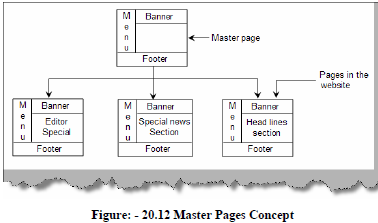
pages Concept shows how a simple website for news channel uses the concept of master pages.
So we have a master page with menu, footer and banner. Then any page with in the website like
the headlines, editor special or special new section pages use the master page template.
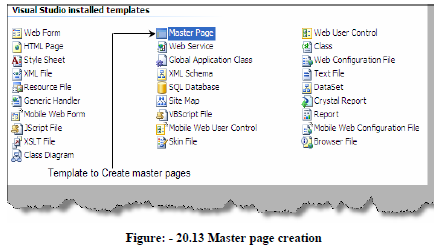
Visual studio has made the creation of master pages very simple by introducing the same as
template VS.NET IDE.
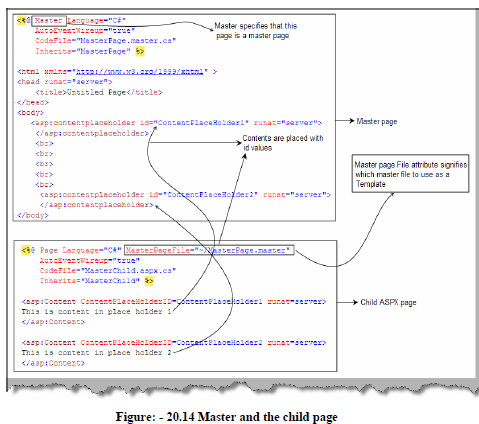
The master gets created by file name Master.master. Below figure gives a complete view of
how the master files interact with the child pages to apply the template. So we have two pages
master and child as shown in figure Master and Child page. Master page have the master
attribute rather than the page attribute. Master page consists of contentplaceholder which acts as
a place holder for data. So in the below master page we have two place holders
ContentPlaceHolder1 and ContentPlaceHolder2. Just below the master page we have shown
the ASPX page which is using the master page. The attribute MasterPageFile points toward the
master page MasterPage.master. We then use the tag to point to the main
master section content place holder. So text This is content in place holder1 is displayed in
ContentPlaceHolder1 and This is content in place holder2 is displayed in
ContenetPlaceHolder2.
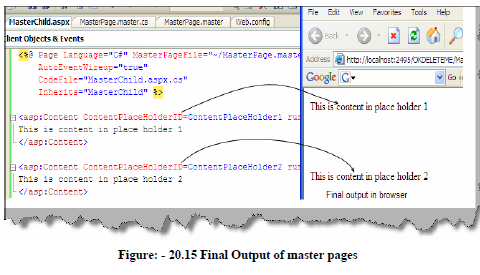
Below figure Final output of master pages shows how the display is.